Many IT professionals, mostly those who focus on technical skills don’t want to work on Word, Excel or Powerpoint. Either they feel like my domain is development, designing, testing ect. Why should I spend my time on documentation or sheets or presentations? Or they haven’t seen how the data in an excel sheet can help their professional career.
In this article I’m gonna speak about Excel / Google sheets specifically. If google sheet had options to modify the UI & UX the way designers want, they could have ruled on a number of domains and apps that already exist. I think you can build all the billings, inventory app in an excel sheet, just the UI won’t be that friendly.
Let’s get back to google sheet, here I won’t be talking about how Google sheet can help IT professionals specifically. Read the article How Google Sheets can help you manage your daily work records?
In this article I will give you an example of how you can use an excel sheet as a billing software. A software where you can enter an item. It will take its price, GST, additional costs or discounts. It will generate a bill in PDF and on a piece of paper as well. You don’t even need to have a printed bill book. All you need is Either google sheet / excel sheet and a printer.
Build a billing software just with the help of Googlesheet
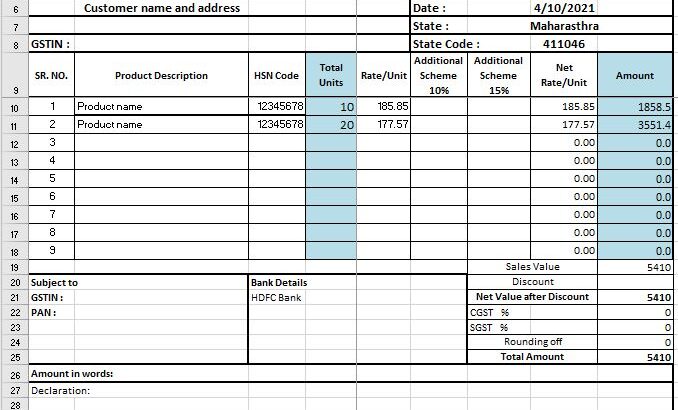
Create two sheets, one as a Master sheet where you list all your products with respect to its details. Add HSN code, mrp, cost with gst, and discount if any for each product. List all your products here. I know it looks like too much work but trust me it’s just a one time investment. In the second sheet, create a table with Sr. No, Product name, HSN code, GST, discount, Quantity and cost of that product (Quantity*Selling price).

In the second sheet, above the table you can add the name, address, contact details and logo of your business. In the footer you can share your bank details and policies, terms and conditions and more. You don’t have to print a bill book.
Once you add both sheets your excel should look like the below images.

I can provide you with a fully working excel sheet. All you need to do is update the master sheet with your products and prices and you’re good to use it as a billing software. If you want to download it you can feel free to drop a comment and I’ll share it to you on your email address.
Whenever you want to create a bill go to your second sheet, product details from the master sheet and paste it in the billing sheet, add quantity and you will get the cost. In the end you can see a total.
Save the sheet as PDF as your e-invoice and take the print of the current sheet for the bill on the paper.
Storing files in your computer
Keep all the PDFs in one folder where you can search it by date / name or invoice number if you want to check the bills in the past. If you work around it well, at the end of the year you will be able to calculate your translation status and manage your accounts in excel only.
Yes I agree that all this can be easily accomplished in paid a software. Point I want to make here is how Excel / Google sheet can also take care of complex work your paid billing software do.